Ad-free · Account optional · Cancel Pro anytime
Count cash without losing track.
Kassensturz counts notes and coins in 35 currencies, including rolls and bundles, is available in six languages and saves your counts on the device. With Pro it shows target vs. actual differences and suggests the float; with an optional account you back everything up encrypted.

Kassensturz
For shops, market stalls, clubs, events and any recurring cash register.
Quick help
The most important answers.
Counting cash
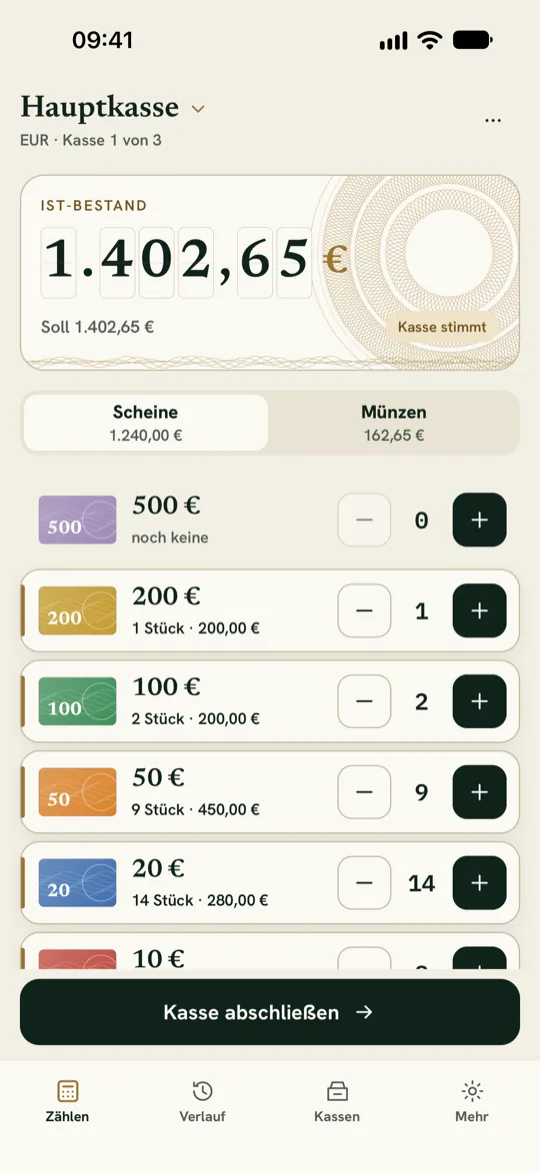
Choose your register’s currency and tap “+” for each piece. Press and hold to enter a quantity directly, including whole rolls and bundles. The total updates instantly.
Saving a count
Tap “Save cash count”. If you installed version 2.2.3 or later, your first count is free; for new counts after that you need Pro. If you counted before that, you keep up to ten free counts in one register. Existing data is never deleted silently and stays readable.
Restoring Pro
Open “More” and choose “Restore purchase”. Use the same Apple or Google account you bought or subscribed to Pro with. With a Kassensturz account, Pro also works on your other devices.
Receipt for your club or company
You buy Kassensturz Pro in the App Store or on Google Play. Apple or Google is therefore the seller, and the receipt for your records also comes from there. We don’t issue our own invoice for in-app purchases. iPhone and iPad: Apple sends receipts to the email address of your Apple Account. You can find all purchases and renewals at reportaproblem.apple.com (opens in a new tab) after signing in with your Apple Account. On iPhone you can also use the App Store: tap your photo or initials at the top and open your purchase history. The receipts show the billing address stored in your Apple Account. If your club or company should appear there, change the billing address before the purchase or before the next renewal. Android: After every purchase, Google sends a confirmation with the order details to the Google account you used to buy. You can see all orders in the Google Play Store: tap your profile icon at the top right, then “Payments & subscriptions” and “Budget & history”. In the browser you can find them at play.google.com (opens in a new tab) under “Payments & subscriptions” and “Budget & order history”. Whether a receipt is sufficient for your club’s or company’s accounts is best clarified with your tax adviser or auditor.
Backing up and transferring data
With a free Kassensturz account you back up registers and counts encrypted and move them to a new device, even between iPhone and Android: on the new device, tap “I already use Kassensturz” and sign in. Without an account, create a backup file under “More”.
Float and deposit
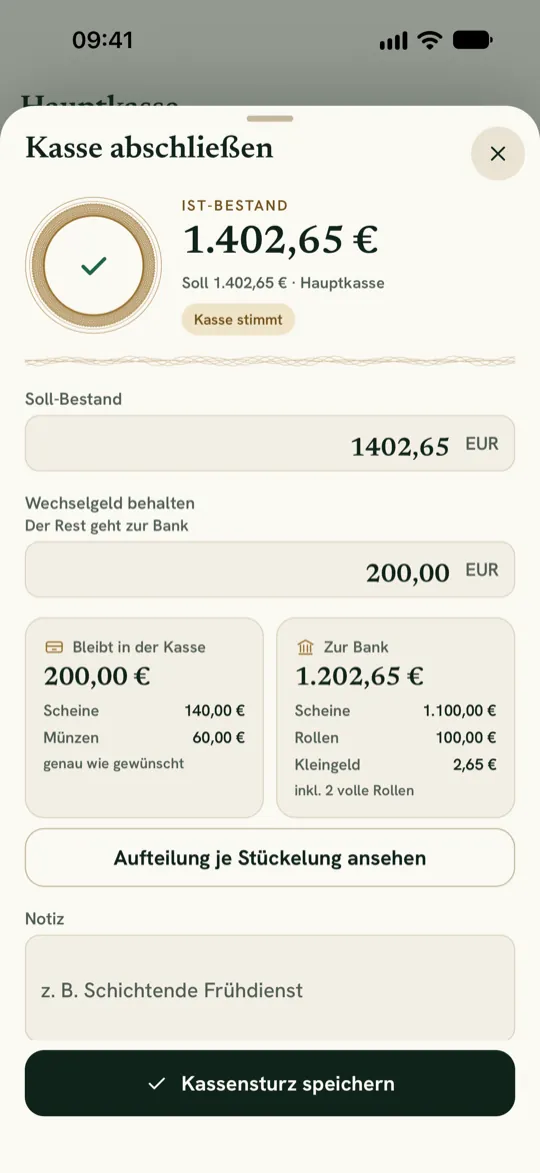
When closing, enter how much float should stay in the register. With Pro, Kassensturz suggests which notes and coins stay and what goes to the bank, and creates a deposit slip for it.
CSV or PDF
Open a saved count and share it with your device’s share function: as a CSV, free for everyone, or as a PDF register receipt with Pro. You share the monthly report from the month card in History the same way: CSV for free, PDF with Pro.
Privacy request
Under “More”, share your privacy ID and send it to support@northprofitstudio.de. Don’t send register contents.
Deleting your account
In the app under “More” → “Account” → “Delete account”, or without the app on the page Delete account (in German, with an English section). The data on your device is kept.
NorthProfit Studio
An app by NorthProfit Studio.
NorthProfit Studio in Düsseldorf, Germany, builds apps for iOS and Android, websites and AI automation – and runs nine products of its own, including Kassensturz.